Long text editor is very much import for future reference for example - Procurement team has finalized source of goods and services. During the discussion with vendors some agreement between both parties for example when Vendor will supply the product and services, what are all the product variants available, vendor giving discounts for which variants,accept invoice online, payment method and other conditions etc. So at time of creation of OA, PR, PO, these kind of details need to mentioned in MS word editor or SAP Text editor.


Long text editor can be possible two ways
Transaction code - SO10
- MS word editor
- Text based editor.
How to enable MS Word editor:
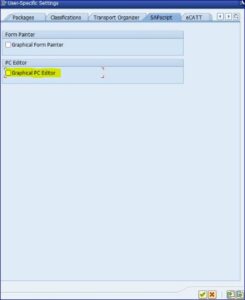
Double click header text —> Select the option Goto in the menu —> Click configure editor —> Tick graphical PC editor under the tab SAPscript.
setting the default editor to ms word sap
Text based editor:
From the top menu GOTO -> select change editor
Permanently switch to the text based editor - From the Go To menu, select Configure Editor.further Uncheck the box for Graphical PC editor.

Please write your comments.


 Views Last 7 days : 98
 Total views : 14997